Mechanical systems Sensing and response

Robotic Arm

SKU E2K-BOW-A-48

Build a wooden robotic arm that turns at the base, reaches out, lifts and grips, then drive all four of those movements from an eight-button remote. A 2.4 GHz link carries every command, and there is a separate gear motor behind each axis.

Grades 6-8 Intermediate 60 min build
Original price was: $34.99.Current price is: $29.99. /kit
Four gear motors, one for each movement the arm makes
Quantity
  • Grades 6–8 · fits a single class period
  • Broken or missing part? We'll post a replacement
What they'll learn

Four ideas, one arm

All of it sits between the buttons in your hand and the gripper at the end.

Mechanical systems

Each motor's gearbox trades speed for the force to lift.

Motion planning

Write down the moves first: reach, turn, grip and release.

Spatial reasoning

Mark a start and a target, then move the object between them.

Repeatable positioning

Mark where it lands, change one move and try again.

Specifications

One arm, down to the last shaft

Finished size, materials and part counts for the build.

Finished size 116 × 111 × 175 mm
Weight 525 g
Materials Wood, plastic
Pieces 100 pieces
Country of origin China
Safety & compliance

Label Warning

Certified with CERTIFICATIONACF. Full printed warnings are supplied in the manual.

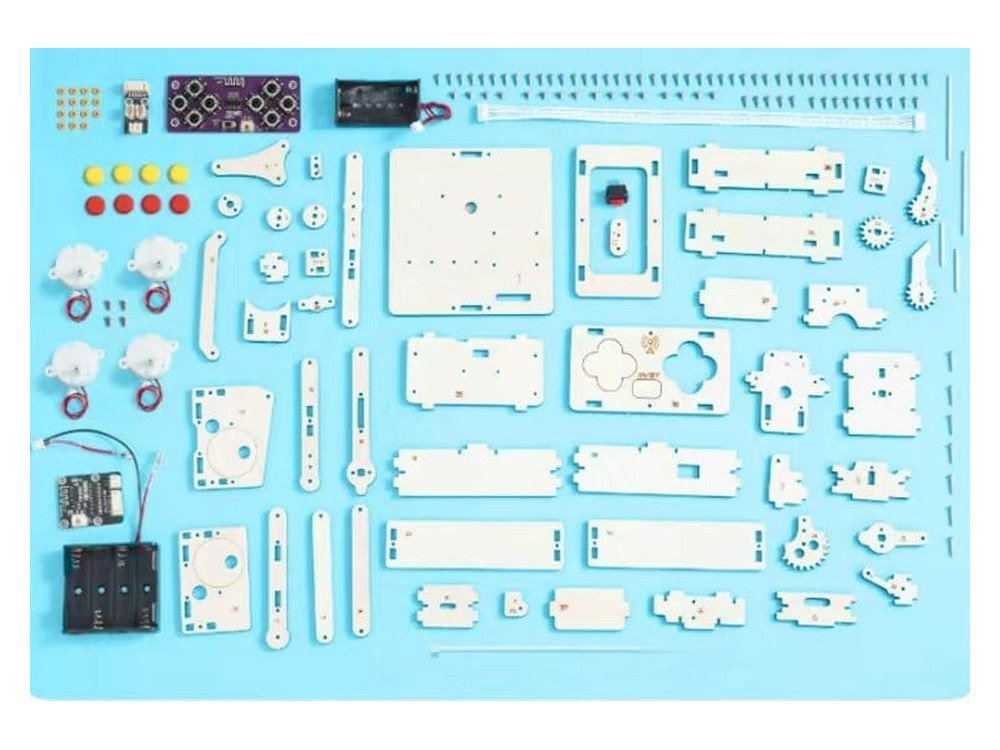
The Robotic Arm kit as supplied, with every plywood plate, the four gear motors, radio boards, battery boxes, shafts and screws laid out
What's in the box

Base, arm, gripper and four gear motors

  • Laser-cut plywood plates, numbered 1 to 40 in build order
  • 4× metal gear motors, one per axis
  • 2× 2.4 GHz eight-channel boards, remote and receiver
  • 8× button caps, four red and four yellow
  • 1× output adapter board, where the motor wiring lands
  • 1× six-way ribbon cable, running up through the base
  • 2× battery boxes, four cells in the arm and two in the remote
  • 1× boat switch, mounted in the side of the base
  • Steel shafts, 3 cm and 6 cm, with orange fixing rings
  • Screws in two lengths, 4 mm and 7 mm coarse
  • Cable ties, trimmed with scissors as you go
  • 1× illustrated English manual, 53 steps

You'll need to supply: 6 × AA batteries, four for the arm and two for the remote, a small screwdriver, and a pair of small scissors to trim the cable ties. The manual asks that an adult be present whenever the scissors are used. It also states that Nanfu batteries and lithium batteries must not be used, and repeats that four separate times without saying which type to fit instead, so we are checking it with the manufacturer before we recommend one. No glue is needed at any point in the build.

How this build works

See mechanics in motion

Build the model, set it loose, and understand the science by watching it work.

Build

Fifty-three steps in three sections: the base and its wiring, then the arm, then the remote. Two screw sizes throughout, and no glue at any point.

Play

Fit six AA cells, switch on at both ends, and the eight buttons give you base rotation, reach, lift and grip.

Experiment

Set two cups apart and move something from one to the other. Four axes, one at a time, in the right order.

Where to start

Master the basics first

Work your way up. Each completed kit unlocks the know-how for your next challenge.

Start here
Remote Control Racing Car
Grades 3–5
24 steps
Then this
Balancing Robot
Grades 3–5
29 steps
You are here
Robotic Arm
Grades 3–5
53 steps
Curriculum alignment

Educator & Procurement Resources

Essential information for classroom integration and school purchasing.

Every kit starts as a box of parts and turns into something kids can actually use. Making that happen means following directions and fixing mistakes along the way. They're tackling real engineering challenges, but to them, it just feels like play.
Product safety
Children's Product Certificate (CPC)
Certified to US children's product safety requirements
STEM.org Authenticated Educational Product trustmark
Independent evaluation
STEM.org Authenticated™ Educational Product
Robotic Arm STEM Kit · STEM ID 195261325
Verify
Mark a start point and a target on a sheet of paper, and place a small, light object on the start. Before touching the controls, have the team write down the moves they think will get it there: reach, turn, grip and release. Run the plan, mark where the object lands, then change one move and try again, swapping who operates, who watches and who records each round. What it shows: every button on the controller makes one movement, and finishing a task means planning those movements in the right order.
Whether you're exploring circuits in a science lab, tackling gears in a makerspace, or learning at home on the living room table, these kits fit right in. One quick tip if you're building a whole class set: build one kit yourself first, so you know where students are likely to need a hand.
PC University Distributors, Inc. is the exclusive distribution partner for E2K Robotics STEM kits to schools and educational institutions. From a single classroom to a district-wide rollout, message the team on WhatsApp at 516-596-1500 or email sales@pcuniversity.com, and they will send educational pricing and the full product list.
What educators & parents say

Reviews

Nothing here yet — and we'd rather say so

Verified reviews will appear on this page as soon as the first Mechanical Dogs are built at home and in classrooms. We don't carry ratings over from other kits in the range, and we don't publish anything that isn't from a verified buyer.

If you've built this one with your class, we'd like to hear how it went — what worked, what didn't, and what you'd change.

Reviews

There are no reviews yet.

Be the first to review “Robotic Arm”

Your email address will not be published. Required fields are marked *

Questions, answered

Before you build

Four things, and each one has its own pair of buttons on the remote. The base turns left and right, the arm reaches forward and back, it lifts and lowers, and the gripper opens and closes. That is eight buttons for four movements, and each movement has its own gear motor driving it, so you can hold one while you work another. What it does not have is any memory or programming: every movement happens while your thumb is on the button and stops when you let go.
Yes, and it is the only kit in our range that is. The manual names the 2.4 GHz eight-channel receiver and the matching remote at several steps, and both boards are in the parts pack. That matters because our other radio kits, the Racing Car and the Balancing Robot, run on 27 MHz instead, and are described that way on their own pages. Eight channels is what lets one remote drive four separate motors rather than two. We don't publish a control range, because nobody has measured it properly and we would rather say so than print a figure we can't stand behind.
It suits grades 3 to 5, but this is comfortably the biggest build we make. Fifty-three steps against twenty-nine for the next longest, four motors to mount and wire, a receiver board, a switch and a ribbon cable to route through the base, and plates numbered up to forty. There is no flame and no glue anywhere in it, which keeps it more approachable than the step count suggests, but it is not a first kit and it is not an afternoon. Treat it as a project across a few sittings, with an adult nearby for the wiring and the scissors.
The arm stands 175 mm tall on a base of 116 × 111 mm, so it takes up about as much desk as a mug and a coaster. The remote is 107 mm across and 36 mm deep, sized to be held in two hands with a thumb over each pad. Leave a clear semicircle in front of it before you switch on, because the base turns a long way and the arm reaches well past the edge of its own footprint.
6 × AA batteries, and the split matters: four go in the arm and two go in the remote, each with its own box and its own switch. You'll also need a small screwdriver and a pair of small scissors for the cable ties, used with an adult present. One thing to know before you shop: the manual states in four separate places that Nanfu batteries and lithium batteries must not be used. It doesn't say which type to fit instead, so we've gone back to the manufacturer for a straight answer and we'll put it here once we have it. No glue is needed at any point.
PC University Distributors, Inc. is the exclusive distribution partner for E2K Robotics STEM kits to schools and educational institutions. Message the team on WhatsApp at 516-596-1500 or email sales@pcuniversity.com for educational pricing, classroom quantities and the full product list.
53-step manual

In English, with a troubleshooting page at the back

Four powered axes

Base, reach, lift and grip, each with its own motor

Schools welcome

Educational pricing through PC University

Before you start

Scissors, six AA cells, and not every battery type works

Build it, then pick something up

Fifty-three steps, four gear motors, and eight buttons that each do one job.

Robotic Arm
Grades 6-8 · Intermediate
Original price was: $34.99.Current price is: $29.99.